


Roadie: road trip planner & rv
4.3111.00 Reviews
App Specs
- Version
- 1.7.7
- Updated On
- License
- Free
- Downloads
- 100,000+
- Developer
- Ori App Studio
- Categories
- Travel & Local
- Platform
- Android
Screenshots
 Analysis by AppCompare
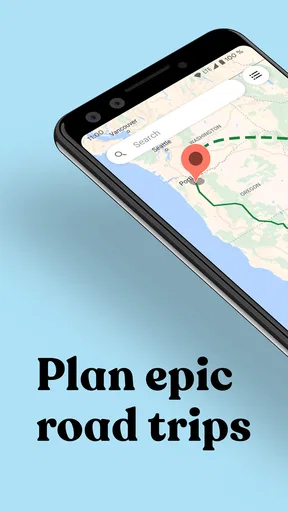
When I plan a road trip, the tricky part is rarely choosing a destination; it is turning a loose collection of ideas into a route that feels manageable. Roadie: road trip planner & rv is aimed at that in-between stage: it gives you a place to shape a journey, arrange stops and keep points of interest together. If you are opening a trip-planning app for the first time, that focused purpose is reassuring. You do not need to begin with a perfect itinerary; you can start with the places you already know you want to visit.
What to expect from a road-trip planner
Roadie is a free travel and local app from Ori App Studio, with optional in-app purchases priced from $1.49 to $39.99 per item. It has an average rating of 4.3 from around 2,100 ratings, and more than 100,000 installs. The app is rated for everyone, and its current version is 1.7.7, with Android 7.0 as the minimum operating system. Those details make it an accessible option to try, though the presence of purchases is worth keeping in mind if you prefer apps with no paid extras at all.
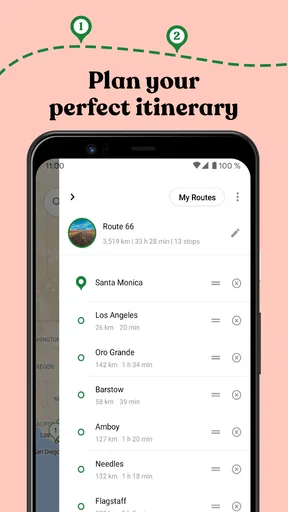
The useful way to think about Roadie is as a planning workspace rather than a replacement for every travel tool. Its central job is helping you lay out a route and collect places you may want to visit. That can be more comfortable than keeping addresses in a notes app, destination pins in a map and the day-by-day order in a message thread. I would still treat a dedicated navigation app as the tool for turn-by-turn driving; a trip plan and live navigation solve related, but different, problems.
Getting Started with Roadie
First things first, downloading and setting up Roadie: road trip planner & rv is a breeze. Available on both Android and iOS, the app's interface is intuitive and user-friendly, even for those who aren't exactly tech-savvy. Once you’ve got it up and running, you’re greeted with a simple dashboard that makes it easy to jump right into planning.
The app's layout is visually appealing, with a clean design that doesn’t overwhelm. It’s like the app wants you to feel relaxed and excited about your upcoming adventure, rather than stressed out by the details. And honestly, who doesn’t want that?
Make the first setup useful, not perfect
For a first-time user, I would begin with one trip and a small number of definite stops. Add the overnight destination and any must-do visit before collecting every café, viewpoint or roadside attraction that catches your eye. That order gives the route a practical backbone. You can then judge whether an extra stop fits the journey instead of building a crowded wish list that looks exciting on a map but is exhausting in real life.
A helpful early choice is to separate fixed commitments from optional ideas. A booked stay or a family visit belongs in the first group; a scenic detour belongs in the second. Even if you later change the order, that distinction makes it easier to see which parts of the plan can move. It also helps when several people are suggesting stops: agree on the essentials first, then let the shared list hold the possibilities.
Worth Reading Before You Choose

Flipboard Shows What News Apps Must Do Beyond the Feed

Switching to Android Auto Means Rethinking Your Driving Routine

Google Calendar Makes a Crowded Week Easier to Manage

Ludo King Makes the Most of the Minutes Between Plans

Baby Panda World Brings Quick Play to Modern Phones, but Its Game Library Feels Busy

ESPN’s Live Game View Makes Following Close Games Easier
Features to Love
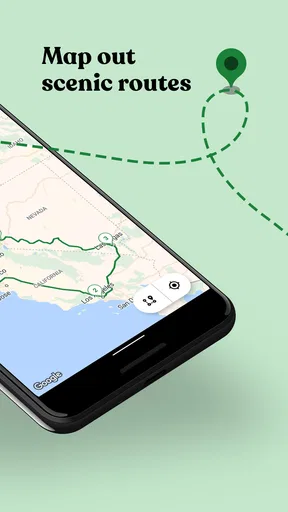
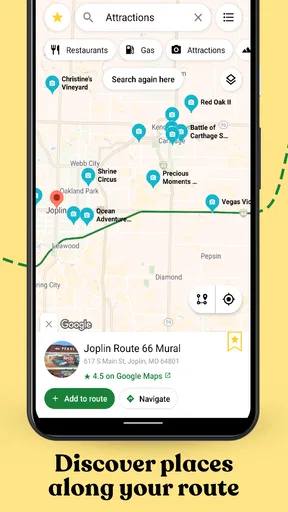
One of the standout features is the ability to create customized itineraries. You can plot your route, add stops, and even adjust travel times based on real-time traffic data. It’s like having a co-pilot who’s always looking out for you. Plus, the app offers suggestions for attractions and must-see spots along your route, which is perfect if you’re looking to explore areas off the beaten path.
For RV enthusiasts, the app is a game-changer. It includes a wealth of information about RV parks, campsites, and rest areas. You can filter these options based on your specific needs, like hookups and pet-friendliness. It’s like having a seasoned RV traveler whispering tips in your ear.
Turn saved places into a workable day
The non-obvious benefit of saving points of interest is not simply remembering them; it is being able to compare them against the shape of the trip. I would use the map to spot when two appealing stops are pulling the day in opposite directions, then keep one as an alternate rather than pretending both will fit. That small bit of editing is often more valuable than adding another recommendation.
For an ordinary weekend example, imagine leaving after work on Friday and driving toward a Saturday event. I would save the event venue and overnight destination first, then add a lunch stop or one short visit for the following day. If the plan starts to feel rushed, the optional stop is easy to drop without losing the important parts. Roadie’s itinerary approach is most useful when it helps you make that kind of decision before you are tired and already on the road.
For an RV trip, I would also check any candidate overnight stop against the needs of the actual vehicle and group before treating it as settled. A filter can narrow the search, but it should not replace checking the details that matter to you, such as the type of hookup or whether a site suits your plans. The trade-off is straightforward: filtering saves time, while a quick final check helps prevent a convenient-looking map result from becoming an inconvenient arrival.
Planning Made Easy
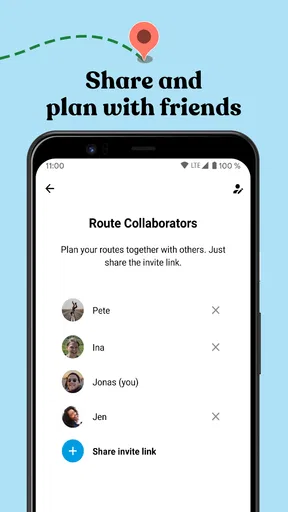
The app also allows you to save and share your trips, which is a lifesaver if you’re planning with friends or family. You can easily collaborate, making it simple for everyone to pitch in with suggestions. The map view is incredibly detailed, so you can zoom in and out to see both the big picture and the finer details.
When several people are involved, I find it useful to ask each person for one or two priorities rather than inviting an endless stream of suggestions. Put those priorities into the plan, then review the route together. This keeps the shared itinerary from becoming a catalogue of every possible stop. It also makes the map easier to read: a route should show the decisions you are considering, not every place anyone has ever mentioned.
One practical trade-off with sharing is that collaboration works best when someone takes responsibility for keeping the plan coherent. If everyone adds stops without checking distance or timing, the itinerary can become less useful even though it contains more ideas. I would nominate one person to do a final pass, resolve duplicates and mark which places are optional. That is a simple habit, but it can make the shared plan much easier to use during the trip.
Another noteworthy feature is the budget tracker. Let’s face it, while road trips are about the journey, keeping an eye on expenses is crucial. The app helps you do just that, allowing you to plan for gas, food, lodging, and more. No more surprises when you check your bank account mid-trip!
What can trip up a new planner
The most common confusion is expecting one app to handle the entire journey from inspiration to the driver’s seat. Roadie is useful for organizing a route and saved places, but a planned itinerary should not be mistaken for a live driving instruction. Before setting off, I would confirm the next destination with the navigation tool I normally use, especially if traffic, road closures or a last-minute change affects the drive. Keeping the roles clear avoids fumbling between a planning view and directions while travelling.
It is also easy to overestimate how much a map can tell you. A cluster of pins may look close together while still taking longer to visit than expected once you account for meals, parking, breaks and the pace of your group. I recommend leaving breathing room between planned activities. The app can help you arrange the stops, but the best itinerary is not necessarily the one with the most stops on it.
The budget tracker is most helpful as a planning prompt, not a promise that every cost will match your estimate. I would enter the categories that are likely to shape the trip and check the total as plans change, rather than treating an early figure as final. Fuel, food and lodging can shift with your route and choices, so keeping the estimate current matters more than entering a long list once and forgetting it.
Roadie may not suit someone who only wants the quickest route from one address to another, or a traveller who prefers to make every decision spontaneously without saving places. In those cases, a standard maps app may be simpler. It may also be less compelling for someone looking for a full booking and reservation hub: its appeal is the organization of a road trip, not replacing every service used to arrange one.
Choosing it over familiar alternatives
Compared with a basic maps app, Roadie gives the trip-planning side more attention: collecting points of interest and thinking about the itinerary as a whole. A maps app is usually the more direct choice when you already know the destination and just need directions. Compared with a notes document or group chat, Roadie offers a map-oriented way to connect the places people are discussing, though a plain note can still be faster for a short drive with only one or two stops.
That distinction helps me decide when to reach for it. A multi-day drive with several possible stops is where a dedicated planner earns its place; a simple commute or a single errand does not need this much structure. For a mixed group, the ability to keep shared trip ideas together is a real convenience, while a person travelling alone with a fixed route may get by just fine with familiar navigation and a short checklist.
Next steps before you leave
Once the route feels sensible, I would do a final review of the order, remove stops that no longer fit and make sure the essential places are easy to recognize. If the trip involves companions, share the plan while there is still time to discuss changes rather than waiting until departure morning. For an RV journey, use the saved options to guide your research, then verify the practical details of the place you intend to use. These checks are not busywork; they turn a collection of ideas into a plan you can actually rely on.
If you are wondering whether Roadie is suitable for a first trip, I think it is, provided you begin with a manageable route instead of trying to plan an entire holiday in one sitting. You can start with the destination, add a few meaningful stops and refine the plan as you learn what your group wants. If you are wondering whether you need to pay to try it, the app is free to download, with optional in-app purchases; I would explore the basic planning flow before deciding whether any paid item is relevant to you.
Ending on a High Note
As my virtual road trip with the app came to a close, I found myself genuinely impressed. Roadie: road trip planner & rv doesn’t just help you plan a trip; it enhances the entire experience. It’s like having a travel buddy who’s always ready with the best advice and insights.
Whether you're a seasoned road warrior or a first-time traveler, this app is a trusty companion. It takes the hassle out of planning and lets you focus on what really matters: making memories and enjoying the ride. So, are you ready to hit the road? With Roadie by your side, all you need to worry about is which playlist to blast while you’re cruising. Safe travels!
Pros
- User-friendly interface for easy planning.
- Customizable routes to suit your preferences.
- Includes weather updates for your trips.
- Offline maps available for remote areas.
- RV-friendly routes with specific stops.
Cons
- Limited free version features.
- Occasional GPS inaccuracies reported.
- Requires in-app purchases for premium.
- Some users find map loading times slow.
- Limited support for international routes.
FAQs for Roadie: road trip planner & rv
What features does Roadie: road trip planner & RV offer?
Roadie provides a comprehensive suite of features to enhance your road trip experience. It includes itinerary planning, route optimization, RV-specific navigation, and points of interest along the way. Users can also explore camping spots, gas stations, and rest areas. The app is designed to cater to both regular travelers and RV enthusiasts.
Is Roadie suitable for international road trips?
Yes, Roadie supports international road trips. The app covers a wide range of countries and offers features like offline maps and local points of interest. However, the availability of certain features may vary based on the country. It’s advisable to check the specific coverage for your destination before traveling.
Does Roadie require an internet connection to function?
While Roadie functions best with an internet connection, it offers offline capabilities for areas with limited connectivity. Users can download maps and itineraries in advance, ensuring access to important information even when offline. However, real-time features, like traffic updates, require an internet connection.
How user-friendly is the Roadie app for beginners?
Roadie is designed with a user-friendly interface, making it accessible for beginners. The app offers a straightforward setup process, and intuitive navigation, and provides tutorials to help new users get started. Its clear instructions and easy-to-use features make it an ideal choice for first-time road trip planners.
What devices are compatible with Roadie: road trip planner & RV?
Roadie is compatible with both Android and iOS devices. It supports a wide range of smartphones and tablets, ensuring that users can access their trip plans on the go. The app is optimized for various screen sizes, allowing for a seamless experience whether you’re using a phone or a tablet.


